

Common identifiers overview
Workspace ID
Required for multi-tenant environments and data isolation
Application ID
Identifies your project/application in API calls
Build ID
References a specific deployed version of your application
Process IDs
Various identifiers for processes and their instances
Workspace identifiers
Workspace ID (Fx-WorkspaceId)
The workspace ID is used to identify the workspace context in multi-tenant environments. It’s required in certain Kafka headers and API calls.Access Organization Settings
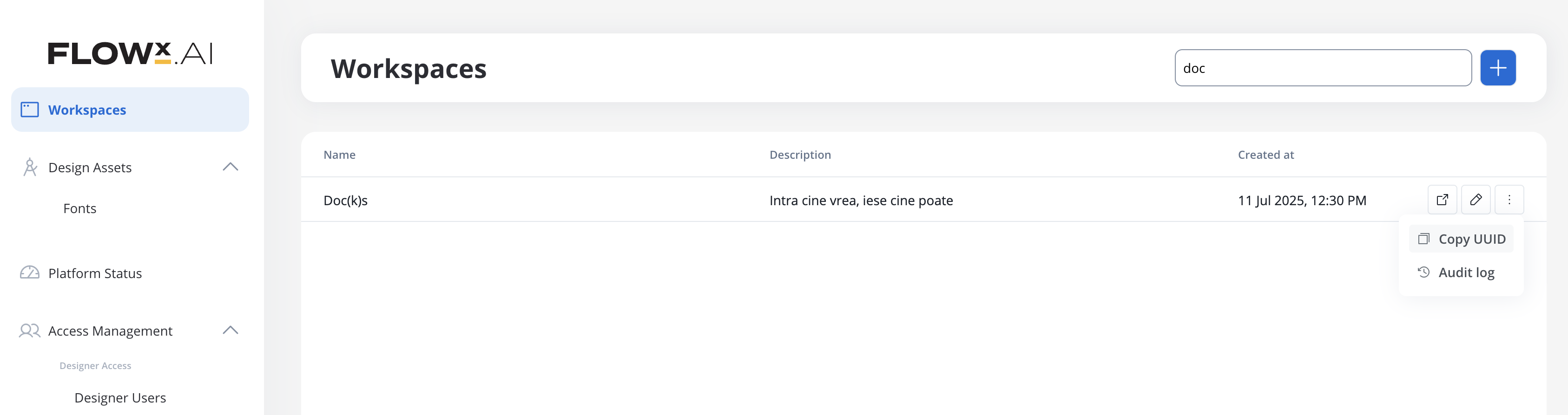
Navigate to Organization Settings from the main menu (available for organization admins and workspace admins).
View Workspace List
You’ll see all workspaces listed. Each workspace card displays:
- Workspace name
- Workspace UUID (this is your Workspace ID)
Default Workspace: If you migrated from a pre-5.x version, your default workspace has the UUID:
00000000-0000-0000-0000-000000000001Where it’s used:
- Kafka header:
Fx-WorkspaceId - API calls requiring workspace context
- Cross-workspace queries and data isolation
Project identifiers
Global Application ID (globalId)
The global application ID is a unique identifier that enables cross-workspace application identification. This identifier remains constant for an application even when it’s shared or referenced across different workspaces.Key characteristics:
- Globally unique: Unlike
appIdwhich is workspace-scoped,globalIduniquely identifies an application across all workspaces - Cross-workspace operations: Used internally for cross-workspace library sharing and application references
- Automatic assignment: Generated automatically when an application is created
Where it’s used:
- Internal cross-workspace application identification
- Library sharing across workspaces
- Cross-workspace data synchronization
Project ID (Fx-AppId, appId)
The project ID (also called application ID or app ID) identifies your project within FlowX. It’s one of the most commonly required identifiers.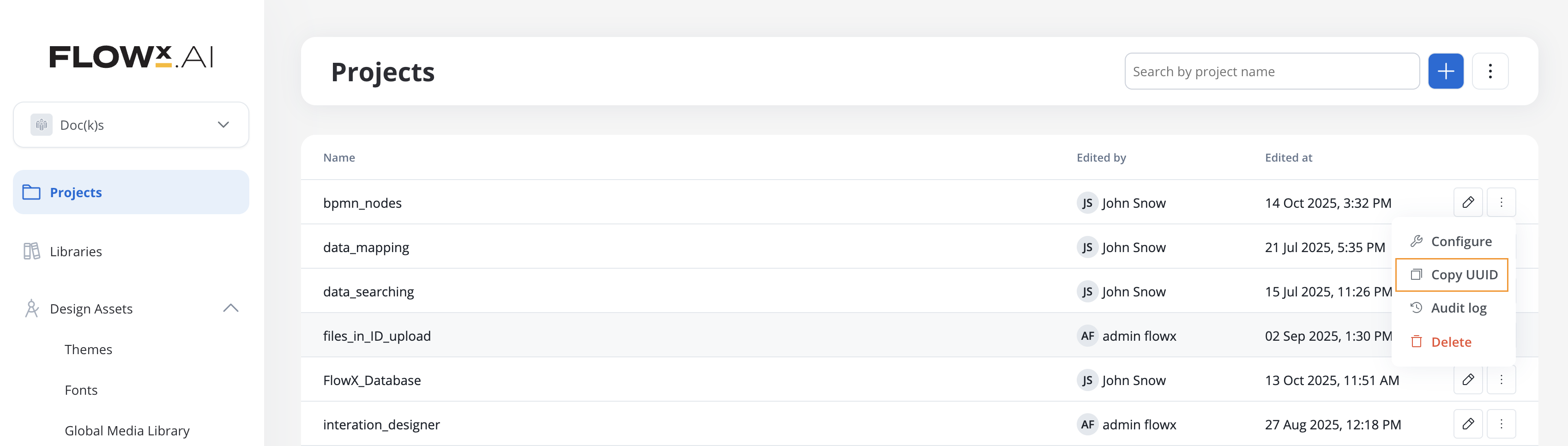
Where it’s used:
- Kafka header:
Fx-AppId - API path parameter:
/app/{appId}/... - Process start requests
- Runtime API calls
Root Application ID (Fx-RootAppId)
The root application ID tracks the originating application throughout process chains, especially when processes spawn subprocesses across different components.Where it’s used:
- Kafka header:
Fx-RootAppId - Tracking process chains across multiple applications
- Subprocess communication
Build identifiers
Build ID (buildId)
The build ID is a unique identifier for a specific committed version of your application that’s been deployed to runtime.View Build List
You’ll see all your builds listed with:
- Build version number
- Commit status
- Creation date
Where it’s used:
- API path parameter:
/build/{buildId}/... - Runtime endpoints used by renderers
- Version-specific API calls
Obtaining Build ID via API
You can retrieve the build ID by calling the builds API endpoint:buildId values.
Application Version ID (appVersionId, Fx-Build-App-Version-Id)
The application version ID (also calledappVersionId or applicationVersionId) identifies a specific app version. Unlike buildId, this identifier is not unique by itself - it’s only unique when combined with workspaceId.
Key distinction:
- buildId: Unique identifier for a committed build (globally unique)
- appVersionId: Identifier for an app version (unique only within a workspace when combined with
workspaceId) - Kafka header
Fx-Build-App-Version-Idcontains theappVersionId, NOT thebuildId
Where it’s used:
- API path parameter:
/app-version/{appVersionId}/... - Kafka header:
Fx-Build-App-Version-Id(replaces deprecatedFx-BuildId) - Internal Kafka communication between FlowX components
- Always used in combination with
workspaceIdfor unique identification
Technical note: In API responses (e.g.,
/api/app/{appId}/app-version/{appVersionId}), you may see the app version ID duplicated in both the main response and within a settings.applicationVersionId field. This happens because the settings object represents a separate database table, and the view combines multiple tables without explicitly excluding the duplicate data.Process identifiers
Process Definition Name (processDefinitionName)
The process definition name is the human-readable name you assigned when creating the process.Where it’s used:
- API path parameter:
/process-name/{processDefinitionName}/start - Kafka header:
Fx-ProcessName(when starting a process via Kafka) - Process configuration and queries
Process Definition UUID
Process definitions have two types of UUIDs, each serving different purposes:- Resource Definition ID (
resourceDefinitionId,processDefinitionFlowxUuid) - Permanent identifier - Resource ID (
resourceId) - Version-specific identifier
Critical distinction:
resourceDefinitionId(also known asprocessDefinitionFlowxUuid): Stays constant across ALL app versions. This is the logical identifier for the process.resourceId: Changes with each app version when the process is modified. This identifies a specific version of the process.
Finding Process Definition UUID (resourceDefinitionId)
TheresourceDefinitionId is the permanent identifier that stays the same across all versions. This is what you typically need for process references and integrations.
Where it’s used:
- Also referred to as
processDefinitionFlowxUuidin some contexts - Process references and linking
- Cross-version queries
- Most integration scenarios (unless you specifically need a version-specific identifier)
Finding Resource ID (version-specific)
TheresourceId identifies a specific version of a process and changes with each app version.
When you might need resourceId: Typically, you won’t need the version-specific
resourceId unless you’re working with internal APIs that specifically require it. Most integrations use resourceDefinitionId instead.Where it’s used:
- Version-specific API operations
- Internal queries that need to target a specific app version
- API responses (returned alongside
resourceDefinitionId)
Resource Definition ID (resourceDefinitionId)
The resource definition ID is a persistent identifier for a resource that stays the same across all app versions. It’s used to track the evolution of a resource through different versions and to link resources together.Key difference from resourceId:
- resourceDefinitionId: Permanent identifier that stays constant across versions. Use this to link resources together (e.g., a process using another process, a process using a workflow) and to track changes between different versions of the same resource.
- resourceId: Version-specific identifier that changes with each app version. Use this when you need to modify or reference a specific version of a resource.
How to find it: This ID is not directly visible in the FlowX Designer UI. It’s returned in the response body when you make a GET request to fetch a specific resource by its resource ID.
- Via API Response
- Via List Endpoints
- Via Browser DevTools
The Examples by resource type:Workflows:Processes:The response includes the
resourceDefinitionId is present in every resource request (GET, update, delete). The URL pattern follows:resourceDefinitionId:Where it’s used:
- Linking resources: When one resource references another (process calls another process, process uses a workflow, etc.)
- Version tracking: To track how a resource evolves across different app versions
- Cross-version queries: Finding all versions of the same logical resource
- API responses: Present in both individual resource requests and list endpoints
- Use
resourceDefinitionIdwhen you need to reference a resource logically, regardless of version - Use
resourceIdwhen you need to work with a specific version of a resource (editing, viewing, deploying)
Understanding the relationship: A practical example
Example: Process referencing a Workflow across versions
Example: Process referencing a Workflow across versions
Let’s say you have:Process A references Workflow B using ✅ The link still works because Process A uses
- Process A (Customer Onboarding)
- Workflow B (Document Verification)
resourceDefinitionId: "workflow-doc-verify"Version 2.0 (After modifying Workflow B):resourceDefinitionId, which remains constant.Why this matters:- When you modify Workflow B and create a new app version, its
resourceIdchanges fromabc-123-v1toabc-456-v2 - But
resourceDefinitionIdstaysworkflow-doc-verify - Process A doesn’t need to be updated because it references the logical resource, not a specific version
- FlowX automatically resolves to the latest version of Workflow B in the active build
- Use
resourceIdin your API calls to edit/update/delete a specific version - Use
resourceDefinitionIdto understand which logical resource is being modified - Use
resourceDefinitionIdto track history: “Show me all versions of this workflow”
Process Instance UUID (processInstanceUuid)
When you start a process, FlowX creates a process instance with its own unique identifier.Open Process Status
Click on a process instance to view its details, then click the Process Status icon.
Where it’s used:
- Kafka header:
processInstanceUuid - API calls to query or manipulate specific process instances
- Correlation in Kafka messages
- Audit log queries
Process Instance ID (processInstanceId)
In addition to the UUID, each process instance has a numeric ID.Both
processInstanceId (numeric) and processInstanceUuid (UUID) identify the same process instance. Use the UUID for most integrations as it’s globally unique.Where it’s used:
- Kafka header:
processInstanceId - Internal database queries
- Some legacy integrations
Token identifiers
Token ID
Tokens represent the current position in a process flow. Each token has an identifier.Open Process Status
Navigate to Runtime → Active Process → Process instances and open a process instance.
Where it’s used:
- Advanced process debugging
- Custom integrations that need to track token movement
- Internal FlowX Engine operations
Context and correlation identifiers
fxContext
ThefxContext header is crucial for routing messages in architectures with embedded processes and subprocesses.
fxContext structure:
- Root process:
"main" - Embedded subprocess (nodeId=4):
"main:4" - Sub-subprocess (nodeId=12 inside subprocess 4):
"main:4:12"
Where it’s used:
- Kafka header:
fxContext - Routing messages to specific subprocesses
- Message correlation in complex process hierarchies
Authentication identifiers
JWT Token
Most API calls and Kafka messages require authentication via JWT token.Obtain from Browser (Development/Testing)
For Development and Testing Only:
- Log into FlowX Designer
- Open browser developer tools (F12)
- Go to the Network tab
- Make any request in FlowX Designer
- Click on the request and view headers
- Find the
Authorizationheader and copy the JWT token (the part after “Bearer ”)
Production Authentication
For Production Integrations:In production environments, external systems should authenticate using your configured Identity Provider (Keycloak or other OAuth2 provider) with appropriate user credentials or OAuth2 flows based on your security requirements.
Work with your Customer Success team or security administrator to set up proper authentication flows for your production integrations. The authentication method will depend on your specific use case and security policies.
Where it’s used:
- HTTP header:
Authorization: Bearer {token} - Kafka header:
jwt(for process starts via Kafka) - All authenticated API calls
Quick reference table
Here’s a quick lookup table for common identifiers:| Identifier | Also Known As | Format | Where to Find | Used In |
|---|---|---|---|---|
| Workspace ID | Fx-WorkspaceId | UUID | Organization Settings → Workspaces OR URL | Kafka headers, API calls |
| Global Application ID | globalId | UUID | API responses (internal) | Cross-workspace operations |
| Application ID | appId, Fx-AppId | UUID | Project URL, Project Settings | API paths, Kafka headers |
| Root Application ID | Fx-RootAppId | UUID | Same as Application ID (in most cases) | Kafka headers |
| Build ID | buildId | UUID | API: /api/app/{appId}/builds | Runtime API paths |
| Application Version ID | appVersionId, applicationVersionId, Fx-Build-App-Version-Id | UUID | Runtime → Builds (not directly visible in UI) | API paths, Kafka headers |
| Process Definition Name | processDefinitionName | String | Definitions → Processes (process name) | API paths, Kafka headers |
| Process Definition UUID | processDefinitionFlowxUuid, resourceDefinitionId | UUID | Process Settings OR URL when editing | Process references, queries |
| Resource ID (version-specific) | resourceId, rid | UUID | API responses only | Version-specific API ops |
| Process Instance UUID | processInstanceUuid | UUID | Runtime → Process Instances → Process Status | Kafka headers, API calls |
| Process Instance ID | processInstanceId | Number | Runtime → Process Instances → Instance Metadata | Kafka headers |
| Token ID | N/A | Number | Process Status → Tokens section | Advanced debugging |
| fxContext | N/A | String | Automatically set by Engine (preserve in responses) | Kafka headers |
Important distinctions:
- buildId vs appVersionId:
buildIdis globally unique and identifies a specific committed buildappVersionIdis only unique when combined withworkspaceId- The Kafka header
Fx-Build-App-Version-IdcontainsappVersionId, NOTbuildId
- resourceDefinitionId vs resourceId:
resourceDefinitionId(also known asprocessDefinitionFlowxUuid): Stays constant across ALL app versionsresourceId: Changes with each app version when the process is modified
Common integration scenarios
Starting a process via HTTP API
Required identifiers:- appId: Application ID (from project)
- buildId: Build ID (obtained via API:
GET /appmanager/api/app/{appId}/builds) - processDefinitionName: Process name (from Definitions → Processes)
- JWT token: From authentication
Note: The
buildId is not directly visible in the FlowX Designer UI. Use the API endpoint mentioned above to retrieve it, or work with your Customer Success team to identify the correct build ID for your environment.Starting a process via Kafka
Required Kafka headers:- Fx-AppId: Application ID
- Fx-ProcessName: Process definition name
- Fx-WorkspaceId: Workspace ID (for multi-tenant setups)
- jwt: JWT token
Responding to Kafka messages from FlowX
Required Kafka headers to preserve:- fxContext: Process context (received from FlowX)
- Fx-AppId: Application ID
- Fx-RootAppId: Root application ID
- Fx-Build-App-Version-Id: Application version ID (contains
appVersionId, used withFx-WorkspaceIdfor unique identification) - Fx-WorkspaceId: Workspace ID
- processInstanceId: Process instance numeric ID
- processInstanceUuid: Process instance UUID
Backward compatibility: You may still see the deprecated
Fx-BuildId header in some messages. FlowX reads both Fx-Build-App-Version-Id (preferred) and Fx-BuildId (legacy) for backward compatibility. Always preserve both headers if present.Troubleshooting
I can't find the workspace ID
I can't find the workspace ID
Solution: Make sure you have either Organization Admin or Workspace Admin permissions. Workspace IDs are visible in Organization Settings → Workspaces.If you can’t access Organization Settings, ask your organization admin to provide the workspace ID or grant you appropriate permissions.
My API calls return 404 for build ID
My API calls return 404 for build ID
Solution: Ensure you’re using the correct identifier for your API endpoint:
- For
/build/{buildId}/...endpoints: You need the actualbuildIdwhich can be obtained via the API: - For
/app-version/{appVersionId}/...endpoints: Use theappVersionId(also referred to in the header asFx-Build-App-Version-Id) - Go to Runtime → Builds and verify the build status is “COMMITTED”
- Check if there’s an Active Policy - this is usually the build you want to reference
- Note that the build UUID is not currently displayed in the UI - use the API endpoint above to retrieve it
Process won't start via Kafka
Process won't start via Kafka
Common issues:
- Missing or incorrect headers: Verify
Fx-AppId,Fx-ProcessName, andjwtheaders - No active policy: Check that the build is set as Active Policy in Runtime → Active Policy
- Authentication failure: Ensure the JWT token is valid and not expired
- Process name mismatch: Process names are case-sensitive - copy exact name from process list
- Payload too large: Ensure your Kafka message payload is under 1MB
Messages not routing to subprocess
Messages not routing to subprocess
Solution: Check the
fxContext header:- For subprocesses,
fxContextmust follow the hierarchical format - Example:
"main:4:12"for a subprocess with nodeId=12 inside subprocess nodeId=4 - Always preserve the exact
fxContextreceived from FlowX Engine - Missing or incorrect
fxContextcauses messages to be delivered to the wrong process level
Can't find process instance UUID
Can't find process instance UUID
Solution:
- Navigate to Runtime → Active Process → Process instances
- Find your process instance by:
- Process definition name
- Start date/time
- Current status
- Click to open process instance
- Click Process Status icon
- The UUID is shown at the top as “Active process instance”
- You’re in the correct workspace
- You have the correct project selected
- The process might be in “Finished” status (use filters)
Related documentation
Creating a Kafka Producer
Learn how to create Kafka producers and understand required headers
API Reference
Explore all available API endpoints and their parameters
Workspaces
Understand workspace concepts and multi-tenant architecture
Starting Processes
Learn different methods for initiating process instances